欢迎光临
请一秒记住我们的网址:www.xinfangs.com !

高颜值登录页面含代码(一键复制)

时间煮雨阅读(1984)

登录页面是每一个项目不可缺少的页面,是一个应用的门面,首次进入看见的可能就是登录界面,做了这么久的前端,发现登录界面其实都大同小异,有时候没必要从头写,我写了几个自认为比较好看的uniapp登录界面记录一下,下次用到的话,可以直接复制过来,修改下就行了。只有静态页面,并未做逻辑上的东西,这样便于在此基础上做调整。


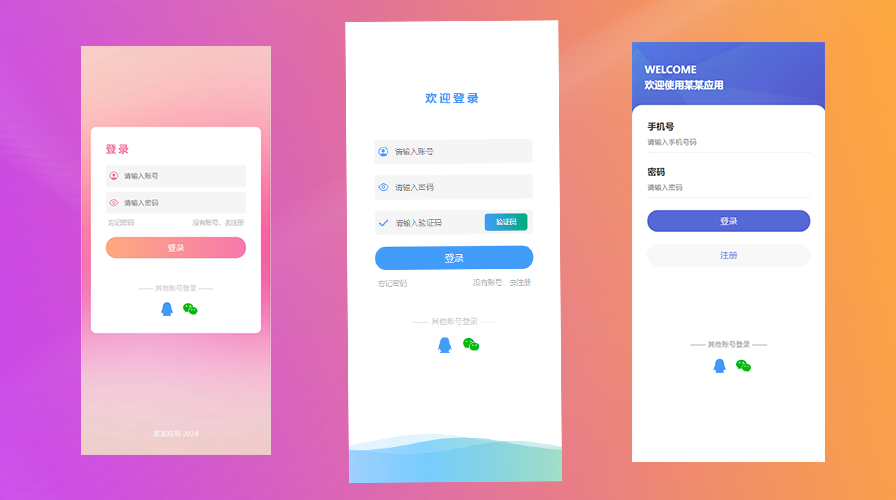
先看效果

实际应用效果
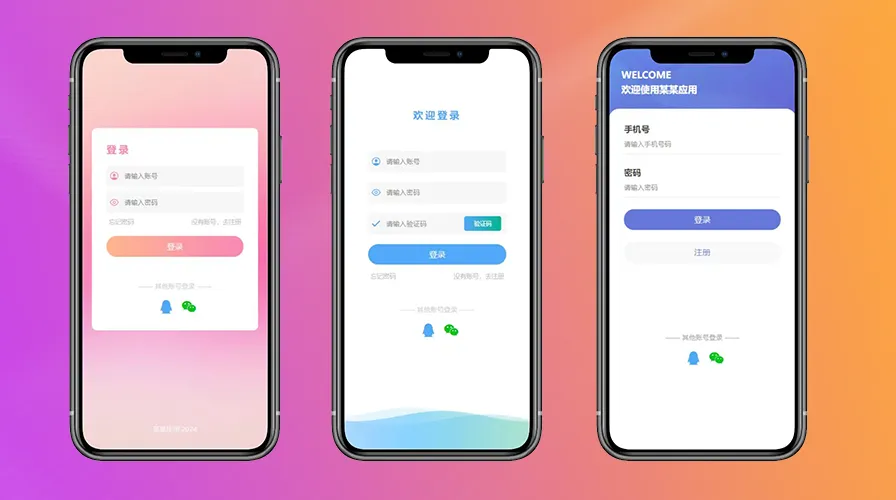

粉色登录界面(图一):

<template>
  <view class="content">
    <view class="loginBox">
      <h3>登录</h3>
      <view class="inputBox">
        <view class="ipt">
          <uni-icons type="contact" size="24" color="rgb(247,120,172)"></uni-icons>
          <input type="text" value="" placeholder="请输入账号"/>
        </view>
        <view class="ipt">
          <uni-icons type="eye" size="24" color="rgb(247,120,172)"></uni-icons>
          <input type="passsword" value="" placeholder="请输入密码"/>
        </view>
        <view class="forgetPwd">
          <span>忘记密码</span>
          <span>没有账号,去注册</span>
        </view>
        <button>登录</button>
      </view>
      <view class="tipbox">
        <view class="txt">
          —— 其他账号登录 ——
        </view>
        <view class="otherUser">
          <uni-icons type="qq" size="40" color="rgb(66,157,250)"></uni-icons>
          <uni-icons type="weixin" size="40" color="rgb(2,187,17)"></uni-icons>
        </view>
      </view>
    </view>
    
    <view class="tip">
      某某应用 2024
    </view>
  </view>
</template>

<script>
  export default {
    data() {
      return {
        
      }
    },
    onLoad() {

    },
    methods: {

    }
  }
</script>

<style scoped>
  .content{
    height: 100vh;
    background: url("https://gimg2.baidu.com/image_search/src=http%3A%2F%2Fc-ssl.duitang.com%2Fuploads%2Fitem%2F202005%2F10%2F20200510005139_JR8fL.jpeg&refer=http%3A%2F%2Fc-ssl.duitang.com&app=2002&size=f9999,10000&q=a80&n=0&g=0n&fmt=auto?sec=1714820289&t=e835cde99a094cbd98f9c318f25160ec") no-repeat;
    background-size: 100% 100%;
  }
  .loginBox{
    position: absolute;
    top: 50%;
    left: 50%;
    transform: translate(-50%,-60%);
    width: 90%;
    background-color: #fff;
    border-radius: 20rpx;
    padding: 60rpx;
    box-sizing: border-box;
  }
  h3{
    color: rgb(247,120,172);
    font-size: 40rpx;
    letter-spacing: 10rpx;
    margin-bottom: 40rpx;
  }
  .inputBox{
    
  }
  .ipt{
    height: 86rpx;
    display: flex;
    justify-content: flex-start;
    align-items: center;
    margin-bottom: 20rpx;
    background-color: #f5f5f5;
    border-radius: 10rpx;
    padding-left: 10rpx;
  }
  .ipt input{
    margin-left: 20rpx;
    font-size: 28rpx;
  }
  .ipt input{
    margin-left: 20rpx;
  }
  .forgetPwd{
    font-size: 26rpx;
    color: #b5b5b5;
    text-align: end;
    padding:0 10rpx;
    display: flex;
    justify-content: space-between;
  }
  button{
    margin-top: 20rpx;
    line-height: 85rpx;
    text-align: center;
    background: linear-gradient(to right,rgb(255, 170, 127),rgb(247,120,172));
    border-radius: 40rpx;
    color: #fff;
    margin-top: 40rpx;
  }
  
  .tip{
    text-align: center;
    font-size: 28rpx;
    position: fixed;
    bottom: 50rpx;
    left: 50%;
    transform: translate(-50%,-50%);
    color: #f4f4f4;
  }
  .tipbox {
    text-align: center;
    margin-top: 100rpx;
  }
  
  .otherUser {
    margin-top: 30rpx;
    display: flex;
    justify-content: center;
  }
  
  .txt {
    font-size: 28rpx;
    color: #cbcbcb;
  }
  
  .otherUser .uni-icons {
    margin-left: 20rpx;
  }
</style>

白色登录界面(图二):

<template>
  <view class="content">
    <svg version="1.1" xmlns="http://www.w3.org/2000/svg" xmlns:xlink="http://www.w3.org/1999/xlink" x="0px" y="0px"
      width="100%" height="100%" viewBox="0 0 1600 900" preserveAspectRatio="xMidYMax slice">
      <defs>
        <linearGradient id="bg">
          <stop offset="0%" style="stop-color:rgba(130, 158, 249, 0.06)"></stop>
          <stop offset="50%" style="stop-color:rgba(76, 190, 255, 0.6)"></stop>
          <stop offset="100%" style="stop-color:rgba(115, 209, 72, 0.2)"></stop>
        </linearGradient>
        <path id="wave" fill="url(#bg)"
          d="M-363.852,502.589c0,0,236.988-41.997,505.475,0
          s371.981,38.998,575.971,0s293.985-39.278,505.474,5.859s493.475,48.368,716.963-4.995v560.106H-363.852V502.589z" />
      </defs>
      <g>
        <use xlink:href='#wave' opacity=".3">
          <animateTransform attributeName="transform" attributeType="XML" type="translate" dur="10s"
            calcMode="spline" values="270 230; -334 180; 270 230" keyTimes="0; .5; 1"
            keySplines="0.42, 0, 0.58, 1.0;0.42, 0, 0.58, 1.0" repeatCount="indefinite" />
        </use>
        <use xlink:href='#wave' opacity=".6">
          <animateTransform attributeName="transform" attributeType="XML" type="translate" dur="8s"
            calcMode="spline" values="-270 230;243 220;-270 230" keyTimes="0; .6; 1"
            keySplines="0.42, 0, 0.58, 1.0;0.42, 0, 0.58, 1.0" repeatCount="indefinite" />
        </use>
        <use xlink:href='#wave' opacty=".9">
          <animateTransform attributeName="transform" attributeType="XML" type="translate" dur="6s"
            calcMode="spline" values="0 230;-140 200;0 230" keyTimes="0; .4; 1"
            keySplines="0.42, 0, 0.58, 1.0;0.42, 0, 0.58, 1.0" repeatCount="indefinite" />
        </use>
      </g>
    </svg>
    
    <view class="loginBox">
      <h3 style="text-align: center;margin-bottom:120rpx;">欢迎登录</h3>
      <view class="inputBox">
        <view class="ipt">
          <uni-icons type="contact" size="24" color="rgb(66,157,250)"></uni-icons>
          <input type="text" value="" placeholder="请输入账号"/>
        </view>
        <view class="ipt">
          <uni-icons type="eye" size="24" color="rgb(66,157,250)"></uni-icons>
          <input type="passsword" value="" placeholder="请输入密码"/>
        </view>
        <view class="ipt">
          <uni-icons type="checkmarkempty" size="24" color="rgb(66,157,250)"></uni-icons>
          <input type="text" value="" placeholder="请输入验证码"/>
          <view class="yzm">
            验证码
          </view>
        </view>
        <button>登录</button>
        <view class="forgetPwd">
          <span>忘记密码</span>
          <span>没有账号,去注册</span>
        </view>
      </view>
      <view class="tipbox">
        <view class="txt">
          —— 其他账号登录 ——
        </view>
        <view class="otherUser">
          <uni-icons type="qq" size="40" color="rgb(66,157,250)"></uni-icons>
          <uni-icons type="weixin" size="40" color="rgb(2,187,17)"></uni-icons>
        </view>
      </view>
    </view>
  </view>
</template>

<script>
  export default {
    data() {
      return {

      }
    },
    methods: {

    }
  }
</script>

<style scoped>
  svg {
    position: absolute;
    bottom: 0;
    left: 0;
    width: 100%;
    height:40%;
    box-sizing: border-box;
    display: block;
    background-color: #ffffff;
  }
  
  .loginBox{
    position: absolute;
    top: 50%;
    left: 50%;
    transform: translate(-50%,-60%);
    width: 90%;
    border-radius: 20rpx;
    padding: 60rpx;
    box-sizing: border-box;
  }
  h3{
    color:rgb(66,157,250);
    font-size: 40rpx;
    letter-spacing: 10rpx;
    margin-bottom: 40rpx;
  }
  .inputBox{
    
  }
  .ipt{
    height: 86rpx;
    display: flex;
    justify-content: flex-start;
    align-items: center;
    margin-bottom: 40rpx;
    background-color: #f5f5f5;
    border-radius: 10rpx;
    padding-left: 10rpx;
  }
  .ipt input{
    margin-left: 20rpx;
    font-size: 28rpx;
  }
  .ipt input{
    margin-left: 20rpx;
  }
  .forgetPwd{
    margin-top: 30rpx;
    font-size: 26rpx;
    color: #b5b5b5;
    text-align: end;
    padding:0 10rpx;
    display: flex;
    justify-content: space-between;
  }
  button{
    margin-top: 20rpx;
    line-height: 85rpx;
    text-align: center;
    background: rgb(66,157,250);
    border-radius: 40rpx;
    color: #fff;
    margin-top: 40rpx;
  }
  
  .tip{
    text-align: center;
    font-size: 28rpx;
    position: fixed;
    bottom: 50rpx;
    left: 50%;
    transform: translate(-50%,-50%);
    color: #f4f4f4;
  }
  .tipbox {
    text-align: center;
    margin-top: 100rpx;
  }
  
  .otherUser {
    margin-top: 30rpx;
    display: flex;
    justify-content: center;
  }
  
  .txt {
    font-size: 28rpx;
    color: #cbcbcb;
  }
  
  .otherUser .uni-icons {
    margin-left: 20rpx;
  }
  .yzm{
    text-align: end;
    font-size: 24rpx;
    background: linear-gradient(to right,rgb(66,157,250),rgb(0, 170, 127));
    height: 60rpx;
    width: 150rpx;
    line-height: 60rpx;
    text-align: center;
    border-radius: 10rpx;
    color: #fff;
  }
</style>

蓝色登录界面(图三):

<template>
  <view class="content">
    <view class="topBox">
      <h3>WELCOME</h3>
      <h3>欢迎使用某某应用</h3>
    </view>
    <view class="inputBox">
      <view class="ipt">
        <h4>手机号</h4>
        <input type="text" value="" placeholder="请输入手机号码" />
      </view>
      <view class="ipt">
        <h4>密码</h4>
        <input type="text" value="" placeholder="请输入密码" />
      </view>
      <button class="loginBtn">登录</button>
      <button class="registerBtn">注册</button>

      <view class="tipbox">
        <view class="txt">
          —— 其他账号登录 ——
        </view>
        <view class="otherUser">
          <uni-icons type="qq" size="40" color="rgb(66,157,250)"></uni-icons>
          <uni-icons type="weixin" size="40" color="rgb(2,187,17)"></uni-icons>
        </view>
      </view>
    </view>
  </view>
</template>

<script>
  export default {
    data() {
      return {

      }
    },
    methods: {

    }
  }
</script>

<style scoped>
  .content {
    height: 100vh;
    background-color: aquamarine;
    background: url("https://www.galaxyclub.cn/Upload/IMAGES/15/0615/38af439784544e95b7c64cad64a14157_650x650.jpg") no-repeat;
    background-size: cover;
  }

  .topBox {
    font-size: 34rpx;
    color: #fff;
    padding: 80rpx 50rpx;
  }

  h3 {
    margin-bottom: 10rpx;
  }

  .inputBox {
    position: fixed;
    bottom: 0;
    left: 0;
    width: 750rpx;
    height: 85vh;
    background-color: #fff;
    border-top-left-radius: 40rpx;
    border-top-right-radius: 40rpx;
    padding: 60rpx;
    box-sizing: border-box;
  }

  .ipt {
    margin-bottom: 50rpx;
  }

  .ipt h4 {
    margin-bottom: 20rpx;
    font-size: 36rpx;
    color: #333;
  }

  .ipt input {
    border-bottom: 1px solid #dedede;
    padding-bottom: 20rpx;
    font-size: 28rpx;
  }

  .loginBtn {
    margin-top: 20rpx;
    line-height: 85rpx;
    text-align: center;
    background: linear-gradient(to right, rgb(86, 104, 214), rgb(86, 104, 214));
    border-radius: 40rpx;
    color: #fff;
    margin-top: 50rpx;
  }

  .registerBtn {
    margin-top: 20rpx;
    line-height: 85rpx;
    text-align: center;
    border-radius: 40rpx;
    color: rgb(86, 104, 214);
    margin-top: 50rpx;
    border: none;
  }

  .tipbox {
    position: fixed;
    bottom: 120rpx;
    left: 50%;
    transform: translate(-50%, -120px);
  }

  .otherUser {
    margin-top: 30rpx;
    display: flex;
    justify-content: center;
  }

  .txt {
    font-size: 28rpx;
    color: #969696;
  }

  .otherUser .uni-icons {
    margin-left: 20rpx;
  }
</style>

如有帮助,求个赞否

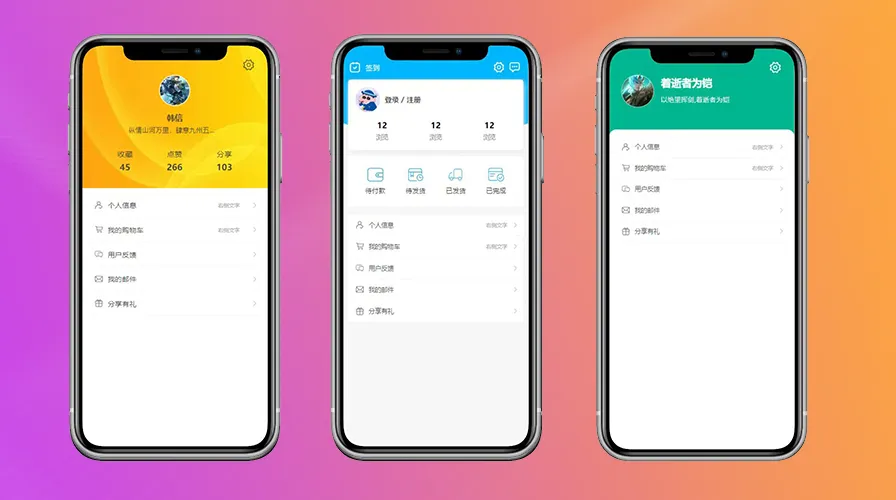
网站个人中心页面可DIY(一键复制)

时间煮雨阅读(1745)

在数字化时代,个人中心页面已成为应用与用户互动的核心区域。它不仅是用户个人信息的展示平台,更是用户体验个性化服务的起点。优秀的个人中心页面设计能够提升用户的满意度和应用的使用频率。今天,我们有幸邀请到了前端技术专家——雪天,为我们分享他如何利用uniapp打造简洁而富有个性的个人中心页面。


01:第一个黄色(图一)

<template>
  <view class="content">
    <view class="tops">
      <uni-icons type="gear" size="32" class="setIcon" @click="setFun"></uni-icons>
      <view class="infos">
        <image
          src="https://img1.baidu.com/it/u=1665929857,2089570148&fm=253&fmt=auto&app=120&f=JPEG?w=500&h=889"
          mode="aspectFill"></image>
        <view class="names">
          韩信
        </view>
        <view class="desc">
          纵情山河万里,肆意九州五岳,爱恨痴狂,抵不过沧海一笑
        </view>
        <view class="t-list">
          <view class="t-item">
            <view class="tit">
              收藏
            </view>
            <view class="vals">
              45
            </view>
          </view>
          <view class="t-item">
            <view class="tit">
              点赞
            </view>
            <view class="vals">
              266
            </view>
          </view>
          <view class="t-item">
            <view class="tit">
              分享
            </view>
            <view class="vals">
              103
            </view>
          </view>
        </view>
      </view>

    </view>

    <view class="lists">
      <uni-list>
        <uni-list-item :show-extra-icon="true" :extra-icon="extraIcon1" showArrow title="个人信息" clickable
          @click="clickList" rightText="右侧文字" />
        <uni-list-item :show-extra-icon="true" :extra-icon="extraIcon2" showArrow title="我的购物车" clickable
          @click="clickList" rightText="右侧文字" />
        <uni-list-item :show-extra-icon="true" :extra-icon="extraIcon3" showArrow title="用户反馈" clickable
          @click="clickList" />
        <uni-list-item :show-extra-icon="true" :extra-icon="extraIcon4" showArrow title="我的邮件" clickable
          @click="clickList" />
        <uni-list-item :show-extra-icon="true" :extra-icon="extraIcon5" showArrow title="分享有礼" clickable
          @click="clickList" />
      </uni-list>
    </view>
  </view>
</template>

<script>
  export default {
    data() {
      return {
        extraIcon1: {
          color: '#666666',
          size: '22',
          type: 'auth'
        },
        extraIcon2: {
          color: '#666666',
          size: '22',
          type: 'cart'
        },
        extraIcon3: {
          color: '#666666',
          size: '22',
          type: 'chatboxes'
        },
        extraIcon4: {
          color: '#666666',
          size: '22',
          type: 'email'
        },
        extraIcon5: {
          color: '#666666',
          size: '22',
          type: 'gift'
        }
      }
    },
    methods: {
      setFun() {
        uni.showToast({
          title: "点击设置",
          icon: "none"
        })
      },
      clickList() {
        uni.showToast({
          title: "点击列表",
          icon: "none"
        })
      }
    }
  }
</script>

<style scoped>
  .tops {
    position: relative;
    height: 580rpx;
    background-color: aquamarine;
    background: url("https://img1.baidu.com/it/u=3643237076,897388802&fm=253&fmt=auto&app=138&f=JPEG?w=800&h=400") no-repeat;
    background-size: 100% 100%;
  }

  .setIcon {
    position: absolute;
    top: 50rpx;
    right: 50rpx;
  }

  .lists {
    padding: 20rpx;
  }

  .tops .infos {
    width: 80%;
    height: 450rpx;
    position: absolute;
    top: 40%;
    left: 50%;
    transform: translate(-50%, -25%);
    text-align: center;
  }

  .infos image {
    width: 120rpx;
    height: 120rpx;
    border-radius: 50%;
    border: 4rpx solid #fff;
  }

  .infos .names {
    font-size: 34rpx;
    color: #333;
    font-weight: 700;
    margin: 20rpx 0 10rpx;
  }

  .infos .desc {
    max-width: 62%;
    font-size: 28rpx;
    color: #333;
    margin: 10rpx auto;
    overflow: hidden;
    text-overflow: ellipsis;
    white-space: nowrap;
    text-align: center;
  }

  .infos .t-list {
    margin-top: 60rpx;
    display: flex;
    justify-content: space-around;
  }

  .t-item .tit {
    font-size: 32rpx;
    color: #333;
    margin-bottom: 10rpx;
  }

  .t-item .vals {
    font-size: 36rpx;
    color: #333;
    font-weight: 700;
    margin-bottom: 10rpx;
  }

  /deep/.uni-list-item__content-title[data-v-296a3d7e] {
    font-size: 30rpx;
    color: #333;
    overflow: hidden;
    font-weight: 500;
  }

  /deep/.uni-list-item__container {
    padding: 30rpx;
  }
</style>

02:第二个蓝色(图二)

<template>
  <view class="content">
    <view class="topBox">
      <view class="setbox">
        <view class="set-left">
          <uni-icons type="calendar" size="30" color="#fff"></uni-icons>
          <view class="txt">签到</view>
        </view>
        <view class="set-right">
          <uni-icons type="gear" size="30" color="#fff" @click="setFun"></uni-icons>
          <uni-icons type="chat" size="30" color="#fff"></uni-icons>
        </view>
      </view>

      <view class="users">
        <view class="u-top">
          <image
            src="https://img2.baidu.com/it/u=2953585264,744730101&fm=253&fmt=auto&app=138&f=JPEG?w=360&h=360"
            mode=""></image>
          <view class="tit">
            登录 / 注册
          </view>
        </view>
        <view class="u-bottom">
          <view class="u-item">
            <view class="num">12</view>
            <view class="u-tit">浏览</view>
          </view>
          <view class="u-item">
            <view class="num">12</view>
            <view class="u-tit">浏览</view>
          </view>
          <view class="u-item">
            <view class="num">12</view>
            <view class="u-tit">浏览</view>
          </view>
        </view>
      </view>
    </view>

    <view class="bottomBox">
      <view class="order-list">
        <view class="o-item">
          <image src="../../static/daifuk.png" mode=""></image>
          <view class="tit">待付款</view>
        </view>
        <view class="o-item">
          <image src="../../static/daifa.png" mode=""></image>
          <view class="tit">待发货</view>
        </view>
        <view class="o-item">
          <image src="../../static/yifa.png" mode=""></image>
          <view class="tit">已发货</view>
        </view>
        <view class="o-item">
          <image src="../../static/wancheng.png" mode=""></image>
          <view class="tit">已完成</view>
        </view>
      </view>
    </view>

    <view class="listBox">
      <view class="lists">
        <uni-list>
          <uni-list-item :show-extra-icon="true" :extra-icon="extraIcon1" showArrow title="个人信息" clickable
            @click="clickList" rightText="右侧文字" />
          <uni-list-item :show-extra-icon="true" :extra-icon="extraIcon2" showArrow title="我的购物车" clickable
            @click="clickList" rightText="右侧文字" />
          <uni-list-item :show-extra-icon="true" :extra-icon="extraIcon3" showArrow title="用户反馈" clickable
            @click="clickList" />
          <uni-list-item :show-extra-icon="true" :extra-icon="extraIcon4" showArrow title="我的邮件" clickable
            @click="clickList" />
          <uni-list-item :show-extra-icon="true" :extra-icon="extraIcon5" showArrow title="分享有礼" clickable
            @click="clickList" />
        </uni-list>
      </view>
    </view>

  </view>
</template>

<script>
  export default {
    data() {
      return {
        extraIcon1: {
          color: '#666666',
          size: '22',
          type: 'auth'
        },
        extraIcon2: {
          color: '#666666',
          size: '22',
          type: 'cart'
        },
        extraIcon3: {
          color: '#666666',
          size: '22',
          type: 'chatboxes'
        },
        extraIcon4: {
          color: '#666666',
          size: '22',
          type: 'email'
        },
        extraIcon5: {
          color: '#666666',
          size: '22',
          type: 'gift'
        },

      }
    },
    methods: {
      setFun() {
        uni.showToast({
          title: "点击设置",
          icon: "none"
        })
      },
      clickList() {
        uni.showToast({
          title: "点击列表",
          icon: "none"
        })
      }
    }
  }
</script>

<style scoped>
  .content {
    background-color: #f5f5f5;
    height: 100vh;
  }

  /* 弧形背景 */
  .topBox {
    width: 100%;
    position: relative;
    z-index: 1;
    overflow: hidden;
    padding: 60rpx 20rpx 20rpx;
    box-sizing: border-box;
  }

  .topBox::after {
    content: "";
    width: 140%;
    height: 200px;
    position: absolute;
    left: -20%;
    top: 0;
    z-index: -1;
    border-radius: 0 0 50% 50%;
    background: #00aaff;
  }

  /* 弧形背景 */
  
  .setbox {
    display: flex;
    justify-content: space-between;
    align-items: center;
  }

  .set-left {
    width: 18%;
    display: flex;
    justify-content: space-between;
    align-items: center;
  }

  .txt {
    color: #fff;
    font-size: 30rpx;
  }

  .set-right .uni-icons {
    margin-right: 10rpx;
  }

  .users {
    margin-top: 20rpx;
    padding: 30rpx;
    box-sizing: border-box;
    height: 280rpx;
    background-color: #fff;
    box-shadow: 1px 10rpx 20rpx #ececec;
    border-radius: 12rpx;
  }

  .u-top {
    display: flex;
    justify-content: flex-start;
    align-items: center;
    margin-bottom: 30rpx;
  }

  .users .u-top image {
    width: 100rpx;
    height: 100rpx;
    border-radius: 50%;
    margin-right: 20rpx;
  }

  .u-top .tit {
    font-size: 30rpx;
    font-weight: 700;
    color: #333;
  }

  .u-bottom {
    display: flex;
    justify-content: space-around;
    align-items: center;
  }

  .u-item {
    text-align: center;
  }

  .u-item .u-tit {
    color: #757575;
    font-size: 26rpx;
    margin-top: 10rpx;
  }

  .u-item .num {
    color: #000000;
    font-size: 33rpx;
    font-weight: 700;
  }

  .bottomBox {
    padding: 20rpx;
    box-sizing: border-box;
  }

  .order-list {
    height: 200rpx;
    margin: -15rpx auto 0;
    padding: 30rpx;
    box-sizing: border-box;
    background-color: #fff;
    border-radius: 12rpx;
    display: flex;
    justify-content: space-around;
    align-items: center;
  }

  .o-item {
    width: 25%;
    text-align: center;
  }

  .o-item image {
    width: 65rpx;
    height: 55rpx;
  }

  .o-item .tit {
    font-size: 28rpx;
    margin-top: 10rpx;
  }

  .listBox {
    height: 200rpx;
    margin: -10rpx auto 0;
    padding: 20rpx;
    box-sizing: border-box;
    border-radius: 12rpx;
  }
</style>

03:第三个绿色(图三)

<template>
  <view class="content">
    <view class="topBox">
      <uni-icons type="gear" size="32" class="setIcon" color="#fff" @click="setFun"></uni-icons>
      <image src="https://img0.baidu.com/it/u=464193705,1968194224&fm=253&fmt=auto&app=120&f=JPEG?w=801&h=500" mode="aspectFill"></image>
      <view class="userName">
        <view class="name">
          着逝者为铠
        </view>
        <view class="desc">
          以绝望挥剑,着逝者为铠
        </view>
      </view>
    </view>

    <view class="listBox">
      <view class="lists">
        <uni-list>
          <uni-list-item :show-extra-icon="true" :extra-icon="extraIcon1" showArrow title="个人信息" clickable
            @click="clickList" rightText="右侧文字" />
          <uni-list-item :show-extra-icon="true" :extra-icon="extraIcon2" showArrow title="我的购物车" clickable
            @click="clickList" rightText="右侧文字" />
          <uni-list-item :show-extra-icon="true" :extra-icon="extraIcon3" showArrow title="用户反馈" clickable
            @click="clickList" />
          <uni-list-item :show-extra-icon="true" :extra-icon="extraIcon4" showArrow title="我的邮件" clickable
            @click="clickList" />
          <uni-list-item :show-extra-icon="true" :extra-icon="extraIcon5" showArrow title="分享有礼" clickable
            @click="clickList" />
        </uni-list>
      </view>
    </view>
  </view>
</template>

<script>
  export default {
    data() {
      return {
        extraIcon1: {
          color: '#666666',
          size: '22',
          type: 'auth'
        },
        extraIcon2: {
          color: '#666666',
          size: '22',
          type: 'cart'
        },
        extraIcon3: {
          color: '#666666',
          size: '22',
          type: 'chatboxes'
        },
        extraIcon4: {
          color: '#666666',
          size: '22',
          type: 'email'
        },
        extraIcon5: {
          color: '#666666',
          size: '22',
          type: 'gift'
        },

      }
    },
    methods: {
      setFun() {
        uni.showToast({
          title: "点击设置",
          icon: "none"
        })
      },
      clickList() {
        uni.showToast({
          title: "点击列表",
          icon: "none"
        })
      }
    }
  }
</script>

<style scoped>
  .content {
    box-sizing: border-box;
    position: relative;
    height: 100vh;
    background-color: #00aa7f;
  }

  .topBox {
    height: 350rpx;
    padding: 50rpx;
    box-sizing: border-box;
    display: flex;
    justify-content: flex-start;
    align-items: center;
  }

  .topBox image {
    width: 130rpx;
    height: 130rpx;
    border-radius: 50%;
    border: 3rpx solid #fff;
    margin-right: 30rpx;
  }

  .topBox .name {
    font-size: 42rpx;
    color: #fff;
    font-weight: 700;
    margin-bottom: 23rpx;
  }

  .topBox .desc {
    font-size: 28rpx;
    color: #ececec;
    margin-bottom: 10rpx;
    text-overflow: ellipsis;
    white-space: nowrap;
    text-align: center;
  }

  .listBox {
    height: calc(100% - 330rpx);
    background-color: #ffffff;
    border-top-left-radius: 30rpx;
    border-top-right-radius: 30rpx;
    margin-top: -20rpx;
    padding: 30rpx 20rpx;
  }
  
  .setIcon {
    position: absolute;
    top: 50rpx;
    right: 50rpx;
  }
</style>

最后,页面中用到了一些本地图片和uniapp的组件,为了更好的一键复制使用,我把整体源码-包含上期的登录页面源码和个人中心页面放在了gitee上,如有需要的话,下面附上

wordpress如何给网站添加收藏本站代码(通用方法)

时间煮雨阅读(1913)

如果你是一个网站控,偶尔发现自己的网站顶部总缺点什么,例如添加一个收藏本站按钮什么的,或者添加其它什么按钮链接什么的,之前有群友就咨询过小编,今天就发布一下给网站添加一个收藏本站链接的功能代码,方法很简单,

方法如下

我们只需要将下面的代码放置到头部文件 header.php 中即可:

<script type="text/javascript">
//收藏本站
function AddFavorite(title, url) {
try {window.external.addFavorite(url, title);}
catch (e) {
try {window.sidebar.addPanel(title, url, "");}
catch (e) {alert("您的浏览器不支持JS收藏,请按 Ctrl+D 进行手动收藏!");}
}
}
</script>

如果你想要独立显示在顶部或者其它地方,我们只需要将 前端代码 放置其中即可,

代码如下:

<a class="help" href="javascript:void(0);" onclick="AddFavorite('<?php bloginfo('name')','<?php bloginfo('url'); ?>')" rel="sidebar">收藏本站</a>

其实在以前的站点当中都会有人在顶部添加此功能,但是如今的站点越来越少在网站添加收藏功能了,原因在于很多网页浏览器中都自带有添加收藏功能了,无需在点击站点内的收藏按钮,无非就是给网站增加了一点美观或效果,并且还给网站加载了 JS代码,用不用此功能都无所谓了,你们觉得呢.

打赏

Ai工具箱 | Ai人工智能导航网站,全网最新最优质AI工具的发现和学习平台!

时间煮雨阅读(2349)

AI工具箱是一个专业的AI工具导航网站,收录了国内外最新最优质的AI工具,包括AI写作工具、AI图像生成和背景移除、AI视频制作、AI音频转录、AI辅助编程、AI音乐生成、AI绘画设计、AI对话聊天等AI工具集合大全,以及AI学习开发的常用网站、框架和模型,帮助你加入人工智能浪潮,自动化高效完成任务!

关于我们:

Ai工具箱致力于帮助新手更快、更可靠地使用到真正实用的Ai工具,提高效率。我们鼓励用户积极推荐优秀的Ai工具,共同丰富我们的资源库。同时,我们特别重视国产Ai工具的收录,为国内Ai技术发展贡献力量。我们承诺,所有收录的工具均经过严格筛选,不会包含任何简单套壳的产品。

如果你有新开发的优质Ai工具,你可以直接免费 提交收录审核 ,目前网站没有接广告计划,后期增加也会慎重审核工具,且充分考虑用户体验上适当增加,不会接影响用户体验的广告。

Ai工具网希望成为您在Ai工具探索之旅中的第一站,我们期待为您提供最专业、最贴心的服务体验。

最后感谢您使用我们的平台,提交最优质Ai工具 ,让我们一起探索Ai的无限可能!

Ai工具箱主题网站:

宝塔 Linux 面板命令大全

时间煮雨阅读(2150)

安装宝塔

CentOS安装脚本

yum install -y wget && wget -O install.sh http://download.bt.cn/install/install_6.0.sh && sh install.sh

Ubuntu/Deepin安装脚本

wget -O install.sh http://download.bt.cn/install/install-ubuntu_6.0.sh && sudo bash install.sh

Debian安装脚本

wget -O install.sh http://download.bt.cn/install/install-ubuntu_6.0.sh && bash install.sh

Fedora安装脚本

wget -O install.sh http://download.bt.cn/install/install_6.0.sh && bash install.sh

管理宝塔

卸载

/etc/init.d/bt stop && chkconfig --del bt && rm -f /etc/init.d/bt && rm -rf /www/server/panel

堡塔命令行工具箱

bt

重启面板

bt 1

https://www.bt.cn/new/btcode.html

当搜索结果为零时,跳转到首页

时间煮雨阅读(2403)

在 WordPress主题网站 搜索文章未找到内容时,会提示“没有您要找的文章”之类的,
如果想在搜索结果没有任何内容时,跳转到首页,那么我们可以这么操作。

将下面的代码添加到 functions.php 中

add_action( 'template_redirect', 'redirect_empty_search_results' );
function redirect_empty_search_results() {
    global $wp_query;
    if ( is_search() && $wp_query->found_posts == 0 ) {
        wp_redirect( home_url() );
        exit();
    }
}

也可以修改其中的:

wp_redirect( home_url() )

跳转到指定的页面,比如:

wp_redirect( 'https://www.baidu.com/');

转自 知更鸟 博客

请一秒记住我们的网址:www.xinfangs.com !

去投稿去留言