新方式博客
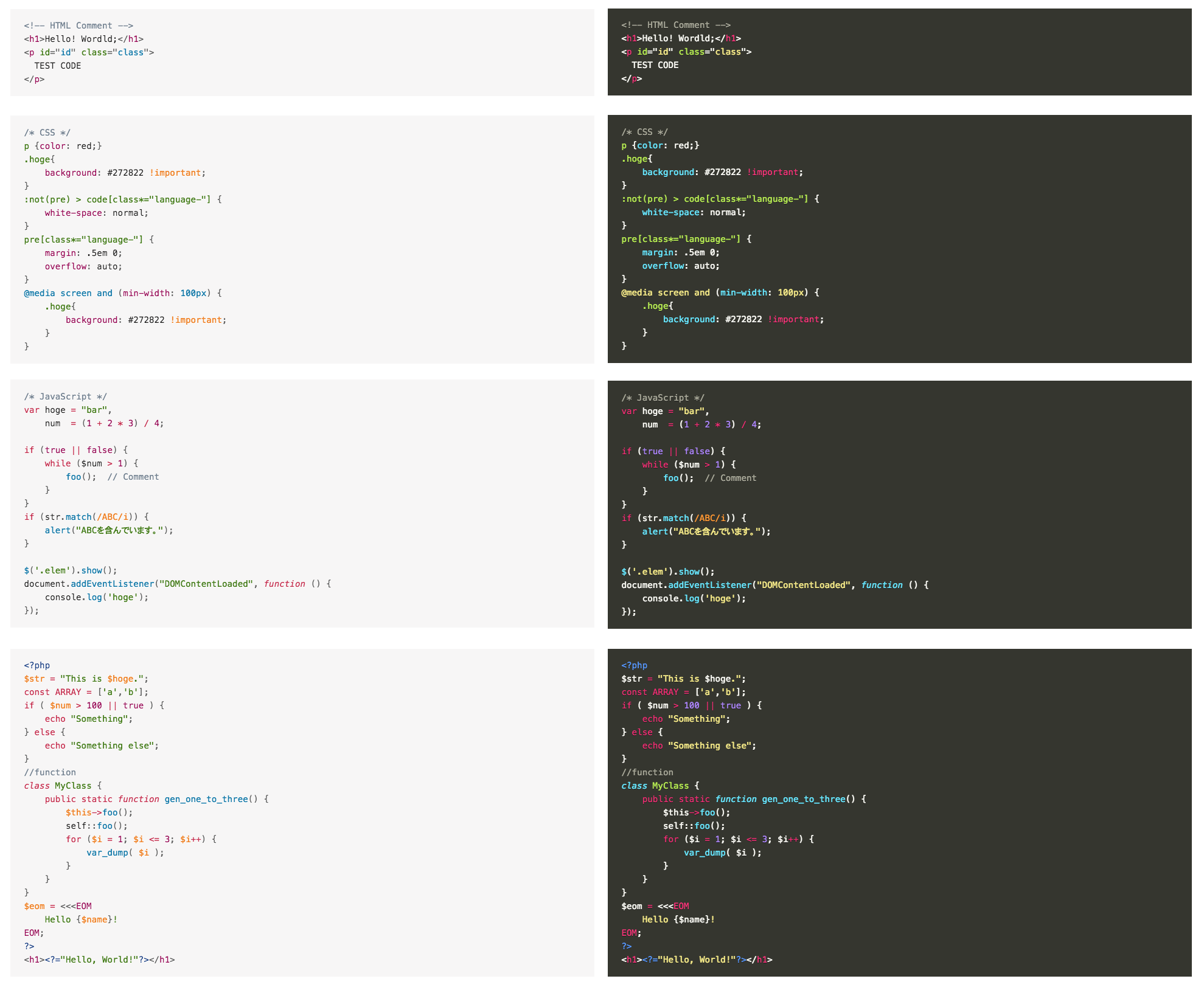
新方式博客这是一款比较简约的代码高亮插件,用起来也很方便,支持经典编辑器和古登堡编辑器。
配色也很听讨好,不挑网站,操作非常简单,在编辑器中,均有对应的按钮来操作,代码复制进去就可以,另外还支持显示代码的对应语言。
以下演示一下:
插件使用教程
1、下载安装插件:网站后台——插件——搜索插件「Highlighting Code Block」在线安装。或者前往 wordpress 插件中心进行下载:
2、点击安装
3、点击插件上的激活
这是一款比较简约的代码高亮插件,用起来也很方便,支持经典编辑器和古登堡编辑器。
配色也很听讨好,不挑网站,操作非常简单,在编辑器中,均有对应的按钮来操作,代码复制进去就可以,另外还支持显示代码的对应语言。
2、点击安装
3、点击插件上的激活
漂亮的 Prism.js 代码高亮插件,在原有的 Prism.js 的基础上添加了一些小小的改动,仿 Mac OS 风格。
本就是使用的 Prism.js ,只不过在原有的 Prism 的基础上添加了一些小小的改动,仿 Mac OS 风格(附件下载),我们直接来一段代码示例:
<!DOCTYPE html>
<html>
<head>
    <script src="<?php bloginfo('template_directory'); ?>/prism/prism.js"></script>
    <link href="<?php bloginfo('template_directory'); ?>/prism/prism.css" rel="stylesheet" />
</head>
<body>
    ...

</body>
</html>
.container .content .copy-link{
    border:1px solid #E5E5E5;
    background:#f9f9f9;
    padding:15px 15px 15px 120px;
    margin-bottom:30px;
    position: relative;
    margin-top:90px;
}
public function init()
{
    parent::init(); // TODO: Change the autogenerated stub
    if(Yii::$app->user->id)
    {
        $this->redirect(Url::home());
    }
}
Prism.js 支持很多种语言和插件主题。把一些不必要支持的语言包下载下来,会加大库文件大小,拖累我们网站加载速度。所以 Prism.js 采用自定义下载,原版 Prism.js 下载地址:点击链接
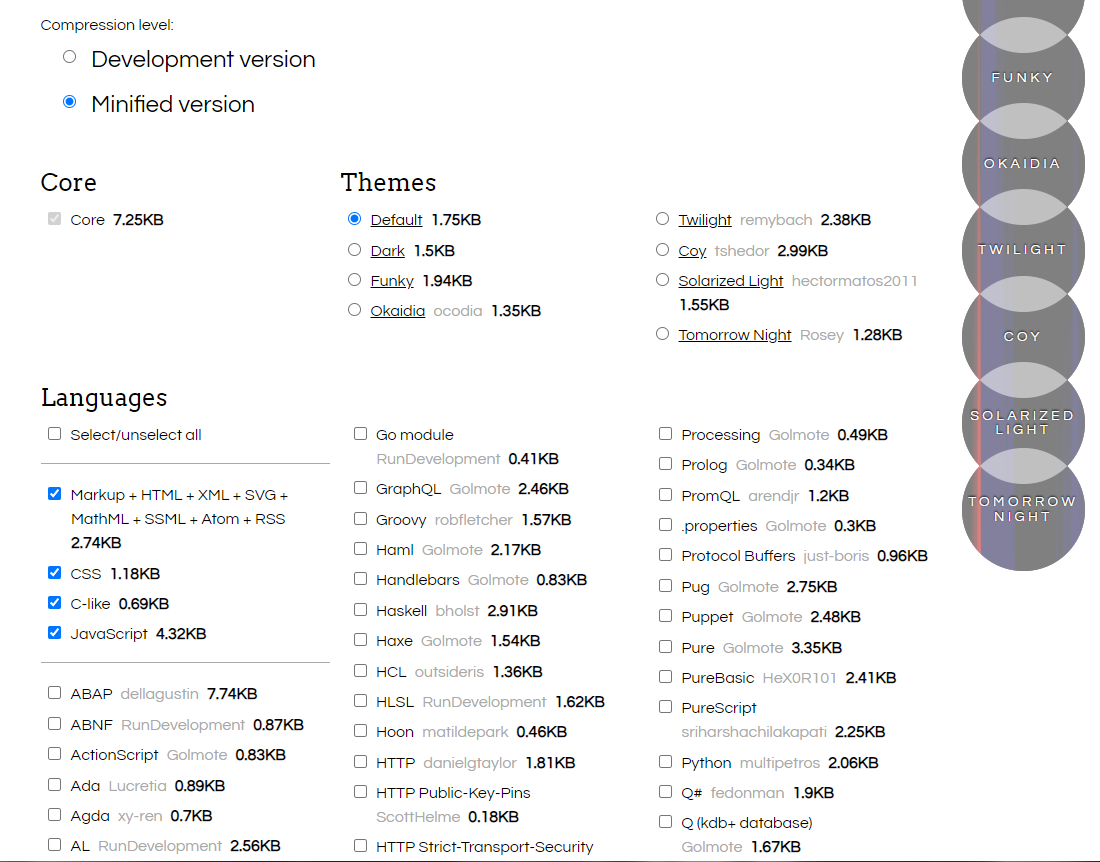
我们勾选上我们需要的语言选项,在最下方的Plugins选项中,有一个Line Numbers还是非常值得下载的,可以在代码前显示行号,点击最下方的下载css和js下载文件。
使用非常简单,首先引入刚刚下载好的2个文件
<!DOCTYPE html>
<html>
<head>
    ...
    <link href="themes/prism.css" rel="stylesheet" />
</head>
<body>
    ...
    <script src="prism.js"></script>
</body>
</html>
wordpress 用户只需要在主题根目录 functions.php 添加如下代码即可,请注意 assets 路径
# 添加代码高亮
function add_prism() {
         wp_register_style(
            'PrismCSS',
            get_stylesheet_directory_uri() . '/assets/css/prism.css'
         );
         wp_register_script(
            'PrismJS',
            get_stylesheet_directory_uri() . '/assets/js/prism.js'
         );
          /*wp_register_script(
            'pure',
            get_stylesheet_directory_uri() . '/assets/js/pure-highlight.js'
         );*/
        wp_enqueue_style('PrismCSS');
        wp_enqueue_script('PrismJS');
        //wp_enqueue_script('pure');
    }
add_action('wp_enqueue_scripts', 'add_prism');
将代码使用如下标签包裹起来
<pre class="highlight"><code class="language-php line-numbers"></code>
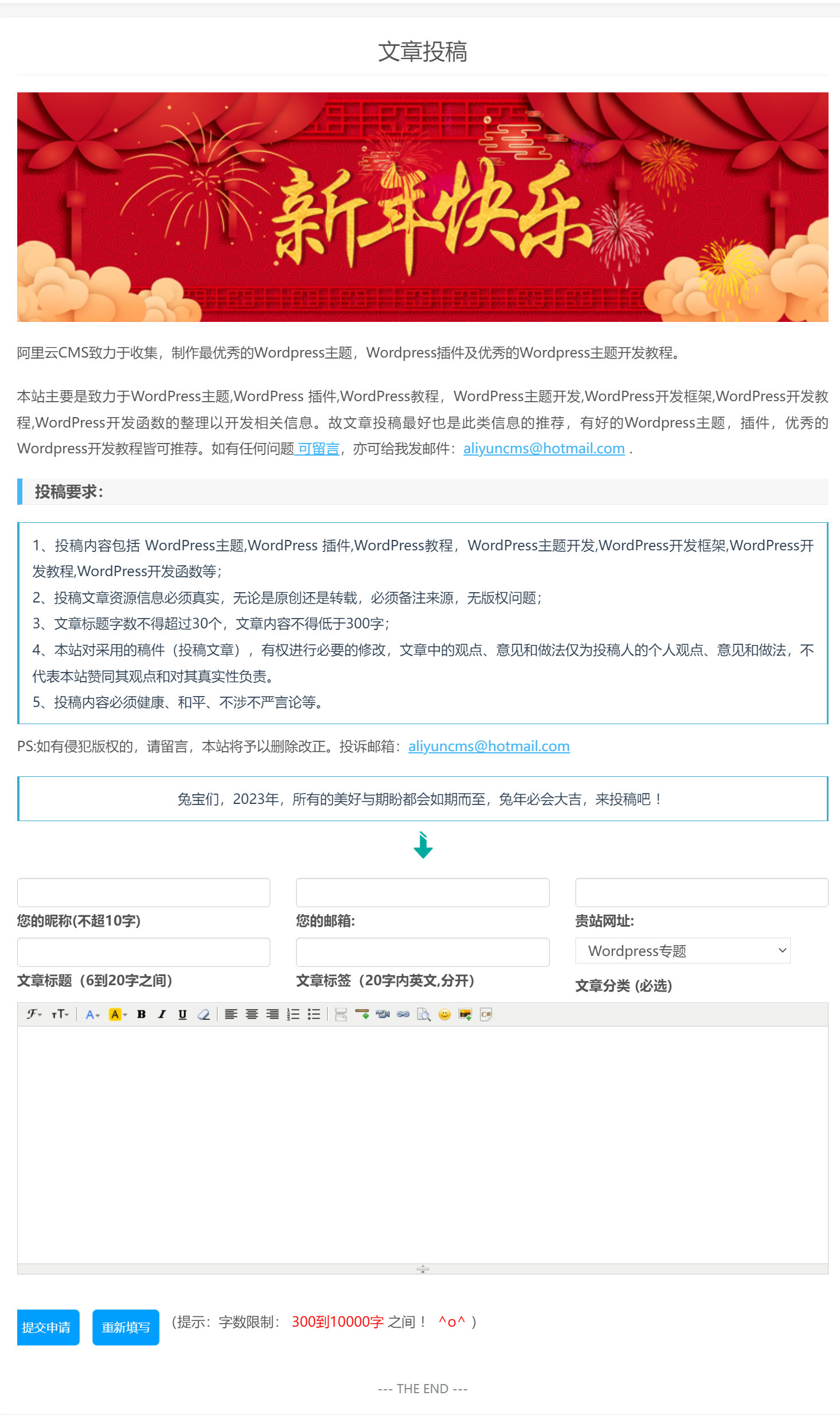
很多网站都想开放读者的投稿功能,接受读者的投稿,不仅可以丰富博客的内容,还可以增加与读者之间的沟通,可以说是一举多得的事情,何乐不为呢?WordPress本身并不提供投稿功能,但是WordPress拥有强大的扩展能力,我们可以自己来添加这个功能。效果如图:
1.在你目前使用的模板的根目录创建一个php文件,命名为 tougao.php,然后将你需要的 page.php 模板中的所有代码复制到 tougao.php 中 ;
修改 tougao.php 开头的注释,即 /* 与 */ 内的内容,修改后如下所示:
/*
 * Template name: 文章投稿
 * Description:   A tougao page
 */
//投稿
if( isset($_POST['tougao_form']) && $_POST['tougao_form'] == 'send'){
    if ( isset($_COOKIE["tougao"]) && ( time() - $_COOKIE["tougao"] ) < 120 ){
        wp_die('您投稿也太勤快了吧,先歇会儿,2分钟后再来投稿吧!');
    }
    // 表单变量初始化
    $name = trim($_POST['tougao_authorname']);
    $email = trim($_POST['tougao_authoremail']);
    $site = trim($_POST['tougao_site']);
    $title = strip_tags(trim($_POST['tougao_title']));
    $category = isset( $_POST['cat'] ) ? (int)$_POST['cat'] : 0;
    $content = $_POST['tougao_content'];
    $tags = strip_tags(trim($_POST['tougao_tags']));
    if(!empty($site)){
        $author='<a href="'.$site.'" title="'.$name.'" target="_blank" rel="nofollow noopener">'.$name.'</a>';
    }else{
        $author=$name;
    }
   $info='<h2> 感谢: '.$author.' '.'投稿</h2> '.' !' ;
    global $wpdb;
    $db="SELECT post_title FROM $wpdb->posts WHERE post_title = '$title' LIMIT 1";
    if ($wpdb->get_var($db)){
        wp_die('发现重复文章.你已经发表过了.或者存在该文章');
    }
    // 表单项数据验证
    if ($name == ''){
        wp_die('昵称必须填写,且长度不得超过20个字');
    }elseif(mb_strlen($name,'UTF-8') > 20 ){
        wp_die('你的名字怎么这么长啊,起个简单易记的吧,长度不要超过20个字哟!');
    }elseif($title == ''){
        wp_die('文章标题必须填写,长度6到25个字之间');
    }elseif(mb_strlen($title,'UTF-8') > 25 ){
        wp_die('文章标题太长了,长度不得超过50个字');
    }elseif(mb_strlen($title,'UTF-8') < 6 ){
        wp_die('文章标题太短了,长度不得少于过6个字');
    }elseif ($email ==''|| !preg_match("/^([a-z0-9\+_\-]+)(\.[a-z0-9\+_\-]+)*@([a-z0-9\-]+\.)+[a-z]{2,6}$/ix", $email)){
        wp_die('Email必须填写,必须符合Email格式');
    }elseif ($content == ''){
        wp_die('内容必须填写,不要太长也不要太短,300到10000个字之间');
    }elseif (mb_strlen($content,'UTF-8') >20000){
        wp_die('你也太能写了吧,写这么多,别人看着也累呀,300到10000个字之间');
    }elseif (mb_strlen($content,'UTF-8') < 50){
        wp_die('太简单了吧,才写这么点,再加点内容吧,300到10000个字之间');
    }elseif ($tags == ''){
        wp_die('不要这么懒吗,加个标签好人别人搜到你的文章,长度在2到20个字!');
    }elseif (mb_strlen($tags,'UTF-8') < 2){
        wp_die('不要这么懒吗,加个标签好人别人搜到你的文章,长度在2到20个字!');
    }elseif (mb_strlen($tags,'UTF-8') > 40){
        wp_die('标签不用太长,长度在2到40个字就可以了!');
    }elseif ($site == ''){
        wp_die('请留下贵站名称,要不怎么宣传呀,这点很重要哦!');
    }elseif ($site == ''){
        wp_die('请填写原文链接,好让其他人浏览你的网站,这是最重要的宣传方式哦!');
    }else{
        $post_content = $info.'<br />'.$content;
        $tougao = array(
            'post_title' => $title,
            'post_content' => $post_content,
            'tags_input'  =>$tags,
            'post_status' => 'pending', //publish
            'post_category' => array($category)
        );
    // 将文章插入数据库
    $status = wp_insert_post( $tougao );
    if ($status != 0){
        setcookie("tougao", time(), time()+1);
        echo ('<div style="text-align:center;">'.'<title>'.'你好!'.'</title>'.'</div>');
        echo ('<div style="text-align:center;">'.'<meta charset="UTF-8" /><meta http-equiv="refresh" content="5;URL=https://www.xinfangs.com">'.'</div>');
        echo ('<div style="position:relative;font-size:14px;margin-top:100px;text-align:center;">'.'投稿成功,感谢投稿,5秒钟后将返回网站首页!'.'</div>');
        echo ('<div style="position:relative;font-size:20px;margin-top:30px;text-align:center;">'.'<a href="/" >'.'立即返回网站首页'.'</a>'.'</div>');
        wp_mail( array('aliyuncms@hotmail.com', $email), "您的投稿主人已经收到啦!", $info, array('Content-Type: text/html; charset=UTF-8') );
        die();
    }else{
        wp_die('投稿失败!');
    }
    }
}
3.在 tougao.php 中搜索: the_content,将其替换成 代码一
<?php the_content(); ?>
<!--S 关于表单样式,请自行调整 S-->
     <form method="post" action="<?php echo $_SERVER["REQUEST_URI"]; $current_user =
     wp_get_current_user(); ?>" class="row">
    <div class="t1 tt col-sm-4">
    <span>
        <input class="form-control" type="text" size="40" value="<?php if ( 0 != $current_user->ID ) echo $current_user->user_login; ?>" name="tougao_authorname"; id="tougao_authorname" tabindex="1" />
    </span>
    <span>
        <label>您的昵称(不超20字)</label>
    </span>
</div>
<div class="t2 tt col-sm-4">
    <span>
     <input class="form-control" type="text" size="40" value="<?php if ( 0 != $current_user->ID ) echo $current_user->user_email; ?>" name="tougao_authoremail" id="tougao_authoremail" tabindex="2" />
    </span>
    <span>
        <label>您的邮箱:</label>
    </span>
</div>
<div class="t3 tt col-sm-4">
    <span>
        <input class="form-control" type="text" size="40" value="<?php if ( 0 != $current_user->ID ) echo $current_user->user_url; ?>" name="tougao_site" id="tougao_site" tabindex="4" />
    </span>
    <span>
        <label>贵站网址:</label>
    </span>
</div>
<div class="t4 tt col-sm-4">
    <span>
        <input class="form-control" type="text" size="40" value="" name="tougao_title" id="tougao_title" tabindex="3" />
    </span>
    <span>
        <label>文章标题(6到50字之间)</label>
    </span>
</div>
<div class="t5 tt col-sm-4">
    <span>
        <input class="form-control" type="text" size="40" value="" name="tougao_tags" id="tougao_tags" tabindex="5" />
    </span>
    <span>
        <label>文章标签(20字内英文,分开)</label>
    </span>
</div>
<div class="t6 tt col-sm-4">
    <span>
        <?php wp_dropdown_categories('show_count=0&hierarchical=1&hide_empty=0'); ?>
    </span>
    <span>
        <label>文章分类 (必选)</label>
    </span>
</div>
<div class="clear"></div>
<div id="postform">
    <textarea rows="15" cols="70"  class="form-control col-sm-12" id="tougao_content" name="tougao_content" tabindex="6" /></textarea>

</div>
</br>
     <div><input type="hidden" value="send" name="tougao_form" />
     <button type="submit" class="btn btn-danger">提交申请</button>
     <button type="reset" class="btn btn-outline-secondary">重新填写</button>
    (提示:字数限制:<font color="red"> 300到10000字 </font> 之间 !<font color="red"> ^o^ </font>)
        </div>

</form>

<!--E 关于表单样式,请自行调整 E-->
2、在 tougao.php 中搜索 /form 或者将代码一中第41行的 /form 改成:
</form>
<script charset="utf-8" src="<?php bloginfo('template_url'); ?>/kindeditor/kindeditor-all-min.js"></script>
<script charset="utf-8" src="<?php bloginfo('template_url'); ?>/kindeditor/kindeditor-all.js"></script>
<script charset="utf-8" src="<?php bloginfo('template_url'); ?>/kindeditor/lang/zh_CN.js"></script>
<script>
/* 编辑器初始化代码 start */
	var editor;
	KindEditor.ready(function(K) {
		editor = K.create('#tougao_content', {
		resizeType : 1,
		allowPreviewEmoticons : false,
		allowImageUpload : true, /* 开启图片上传功能,不需要就将true改成false */
		items : [
			'fontname', 'fontsize', '|', 'forecolor', 'hilitecolor', 'bold', 'italic', 'underline',
			'removeformat', '|', 'justifyleft', 'justifycenter', 'justifyright', 'insertorderedlist',
			'insertunorderedlist', '|','pagebreak','hr','media', 'link', 'preview', 'emoticons', 'image' ,'code']
		});
	});
/* 编辑器初始化代码 end */
</script>
<script src="<?php bloginfo('template_url'); ?>/kindeditor/prism/prism.js"></script>
<link rel="stylesheet" href="<?php bloginfo('template_url'); ?>/kindeditor/prism.css">
<script charset="utf-8" src="../kindeditor-all-min.js"></script>
<script charset="utf-8" src="../lang/zh_CN.js"></script>
<script>
	... 编辑器初始化代码
</script>
3.如果感觉 样比较复杂也可以用 WordPress 自带的 tinymce编辑器 ,可以在 /form 后下加上如下代码:
<script type="text/javascript" src="<?php echo home_url(); ?>/wp-includes/js/tinymce/tinymce.min.js"></script>
<script type="text/javascript">
  tinymce.init({
    selector : '#tougao_content',
    menubar: false,
    //toolbar: false,
});
</script>
最后再把下面的 css 甩在 style.css中即可。
/***************投稿**************/
.form{padding:0 20px;}
.form div.tt{float:left;width:460px;margin:10px 0;}
.form input,.t6 #cat{width:250px;height:30px;padding:0 10px;}
#submit_post{margin:20px 0;}
#submit_post input{width:150px;height:50px;}
#postform{width:100%;padding:0 15px;}
#tougao_content{
    width: 100%;
}
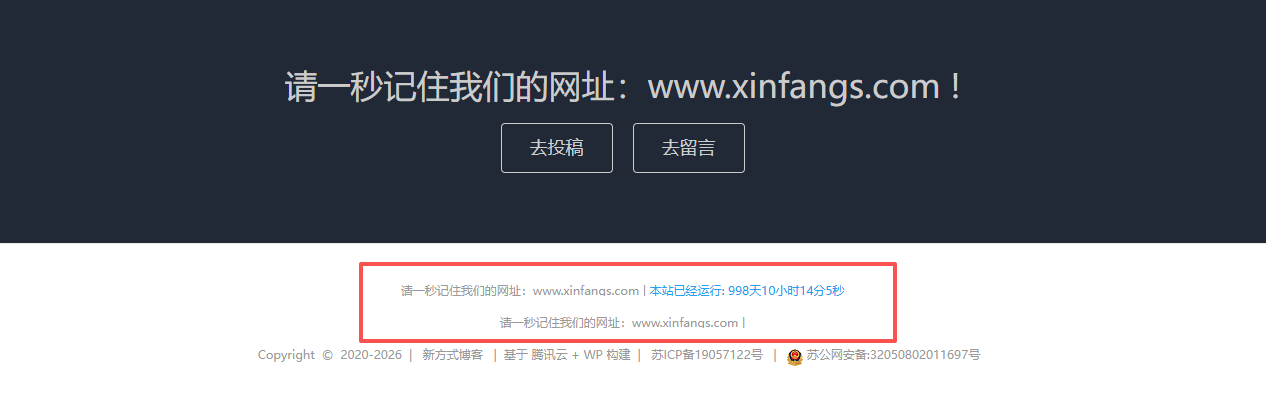
之前在网站底部有网站运行时间,有的网友来问是怎么实现的,今天就把我自己用的代码分享下,有需要的直接拿去使用即可。
我们只要将下面的代码添加到网站主题的底部代码添加的位置(一般的WordPress主题都有这个功能),添加后保存即可。如果你的主题没有就添加到 footer.php 中,自行添加即可。
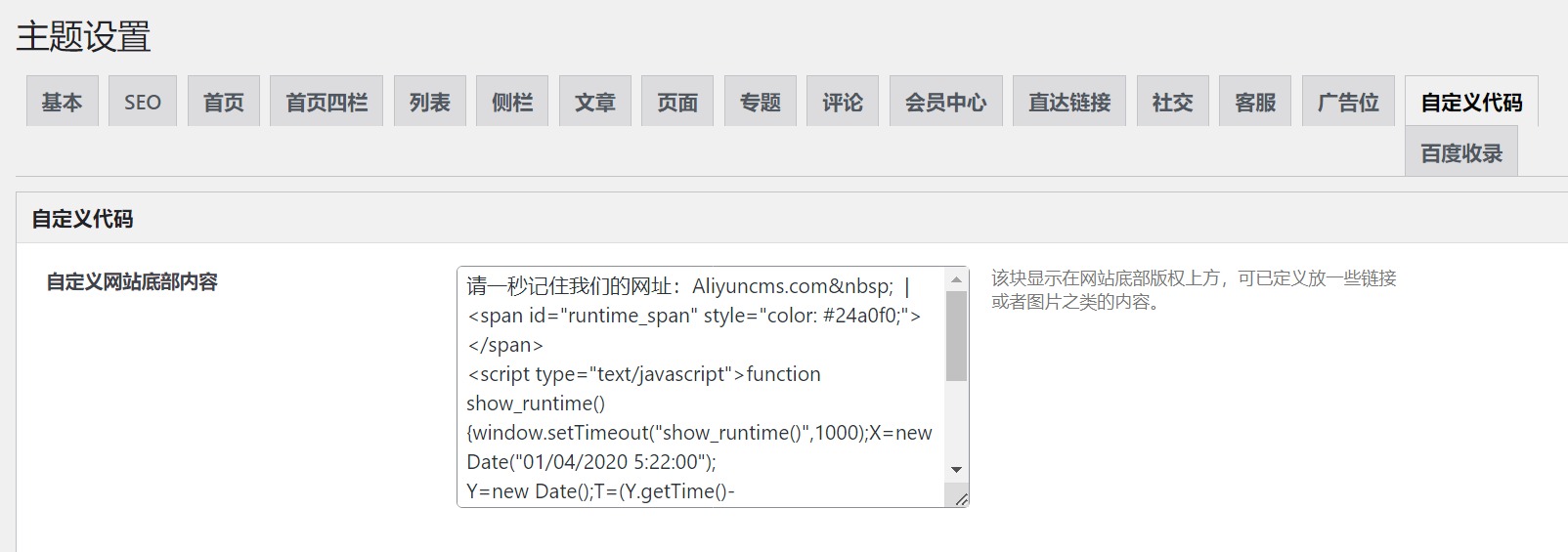
请一秒记住我们的网址:xinfangs.com   |
<span id="runtime_span" style="color: #24a0f0;"></span>
<script type="text/javascript">function show_runtime(){window.setTimeout("show_runtime()",1000);X=new
Date("01/04/2020 5:22:00");
Y=new Date();T=(Y.getTime()-X.getTime());M=24*60*60*1000;
a=T/M;A=Math.floor(a);b=(a-A)*24;B=Math.floor(b);c=(b-B)*60;C=Math.floor((b-B)*60);D=Math.floor((c-C)*60);
runtime_span.innerHTML="本站已经运行: "+A+"天"+B+"小时"+C+"分"+D+"秒"}show_runtime();</script>
PS:又额外整理了几款,有需要的直接拿。

请一秒记住我们的网址:xinfangs.com   |
<span id=span_dt_dt style="color: #2F889A;"></span>
<script language=javascript>
function show_date_time(){
window.setTimeout("show_date_time()", 1000);
BirthDay=new Date("2/28/2019 10:15:45");
today=new Date();
timeold=(today.getTime()-BirthDay.getTime());
sectimeold=timeold/1000
secondsold=Math.floor(sectimeold);
msPerDay=24*60*60*1000
e_daysold=timeold/msPerDay
daysold=Math.floor(e_daysold);
e_hrsold=(e_daysold-daysold)*24;
hrsold=Math.floor(e_hrsold);
e_minsold=(e_hrsold-hrsold)*60;
minsold=Math.floor((e_hrsold-hrsold)*60);
seconds=Math.floor((e_minsold-minsold)*60);
span_dt_dt.innerHTML='<font style=color:#C40000>'+daysold+'</font> 天 <font style=color:#C40000>'+hrsold+'</font> 时 <font style=color:#C40000>'+minsold+'</font> 分 <font style=color:#C40000>'+seconds+'</font> 秒';
}
show_date_time();
</script>

请一秒记住我们的网址:xinfangs.com   |
<span id="sitetime" style="color:#096"></span>
<script>
function siteTime(){
window.setTimeout("siteTime()", 1000);
var seconds = 1000
var minutes = seconds * 60
var hours = minutes * 60
var days = hours * 24
var years = days * 365
var today = new Date()
var todayYear = today.getFullYear()
var todayMonth = today.getMonth()
var todayDate = today.getDate()
var todayHour = today.getHours()
var todayMinute = today.getMinutes()
var todaySecond = today.getSeconds()
var t1 = Date.UTC(2019,2,29,10,15,45)
var t2 = Date.UTC(todayYear,todayMonth,todayDate,todayHour,todayMinute,todaySecond)
var diff = t2-t1
var diffYears = Math.floor(diff/years)
var diffDays = Math.floor((diff/days)-diffYears*365)
var diffHours =Math.floor((diff-(diffYears*365+diffDays)*days)/hours)
var diffMinutes =Math.floor((diff-(diffYears*365+diffDays)*days-diffHours*hours)/minutes)
var diffSeconds =Math.floor((diff-(diffYears*365+diffDays)*days-diffHours*hours-diffMinutes*minutes)/seconds)
document.getElementById("sitetime").innerHTML=""+diffYears+" 年 "+diffDays+" 天 "+diffHours+" 小时 "+diffMinutes+" 分钟 "+diffSeconds+" 秒"
}
siteTime()
</script>
Font Awesome 是互联网上最受欢迎的图标集。您可以访问可以使用 css 自定义的高质量矢量图像。最重要的是,Font Awesome 提供了一个免费版本,其中包含 1,600 多个免费图标供您使用。在 WordPress 中设置和使用 Font Awesome 很容易。在本文中,我们将介绍在 WordPress 中启动和运行 Font Awesome 所需的所有步骤。
最新的4.7.0版,收录了675个图标…如果你觉得本页图标太小…这里来看看。 如果你是名设计师,并且需要在Photoshop或Illustrator等其他桌面应用中使用,请访问 Font Awesome 矢量版.
这里有两个办法可以实现,一个是直接用插件,一个是用代码。
我们可以直接搜索Font Awesome Icons插件安装激活。然后根据需要进行添加到内容、导航中都可以。
1,首先我们要通过官方下载到 fontawesome 文件包,将 font-asesome 文件夹直接解压到你主题的根目录下
2. 打开主题的 functions.php,添加如下代码:
// 代码实现 xinfangs.com
add_action( 'wp_enqueue_scripts', 'load_fontawesome_styles' );
function load_fontawesome_styles(){
    global $wp_styles;
    wp_enqueue_style( 'font-awesome', get_template_directory_uri() . '/font-awesome/css/font-awesome.min.css' );
    wp_enqueue_style( 'font-awesome-ie7', get_template_directory_uri() . '/font-awesome/css/font-awesome-ie7.min.css' );
    $wp_styles->add_data( 'font-awesome-ie7', 'conditional', 'lte IE 7' );
}
3. 大功告成,下面就是使用了,官方推荐的方法是用i标签加class来添加,例如:
<i class="fa fa-refresh fa-spin"></i>
这款主题是由【秋知德雨】博主开发的WordPress 免费主题,主题风格简约,源码多套前端模板、多套分类模板、多套内容模板,主题高强度DIY,自定义网站背景图片,可以自定义头部图片,需要的自行下载!